This post contains affiliate links. Full disclosure at the bottom.
Short version: Systeme.io's free plan is the real deal, with one catch that's easy to miss. You get 2,000 contacts and unlimited emails, but only one automation rule and one tag, and our very first funnel used up both. Here's what else we ran into, and how to plan around the Systeme.io free plan limits so you don't have to rebuild later.
Open a free Systeme.io account (no card needed) →
Before we put a single email address into Systeme.io, we wanted to know the catch. A free plan with no credit card and no end date sounds too good to be true, so on October 25, 2026, we built what a teacher or new creator would actually make: a free checklist, a sign-up page, a thank-you page, and a welcome email. It's the same test account behind our full Systeme.io review.
Signing up took about four and a half minutes. Nobody asked for a card, and there was no plan to pick. The account simply landed on Free. From there we chose Systeme.io's "Build an audience" goal, which created an opt-in page and a thank-you page for us, and we had a basic page for our Free Teacher Productivity Checklist live in about four minutes.
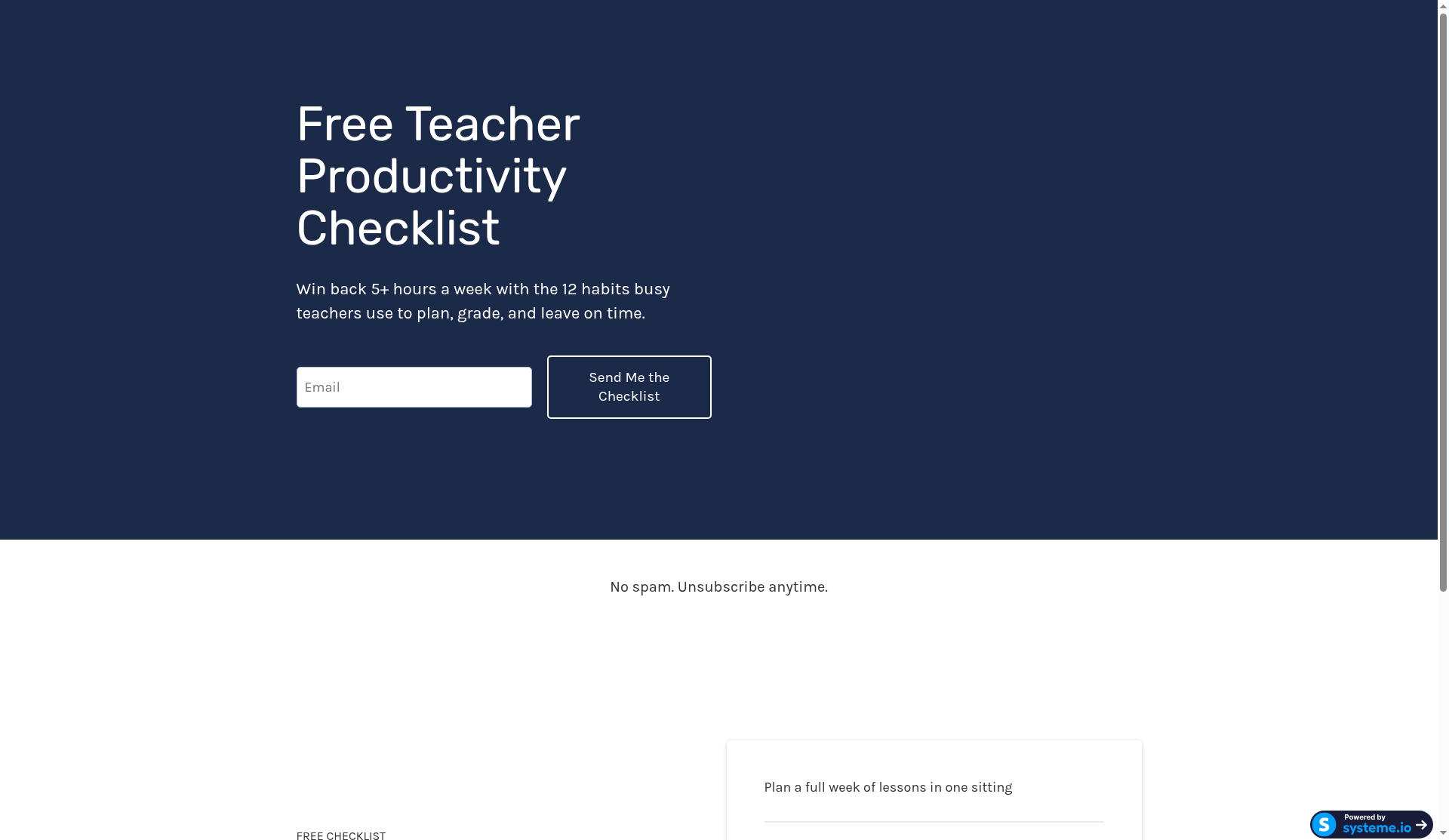
Mostly, it held up. The first limit we bumped into wasn't the 2,000 contacts. It was something much smaller.
The catch: one automation rule and one tag
Our funnel needed one automation: when someone signs up, tag them and send the welcome email. In Systeme.io that's a single rule ("opt-in form subscribed") with two actions inside it, one that adds a tag we called checklist-optin and one that sends the email. It saved without any trouble. In our test, the welcome email went out about two seconds after a sign-up and landed in Gmail's Promotions tab, not spam.
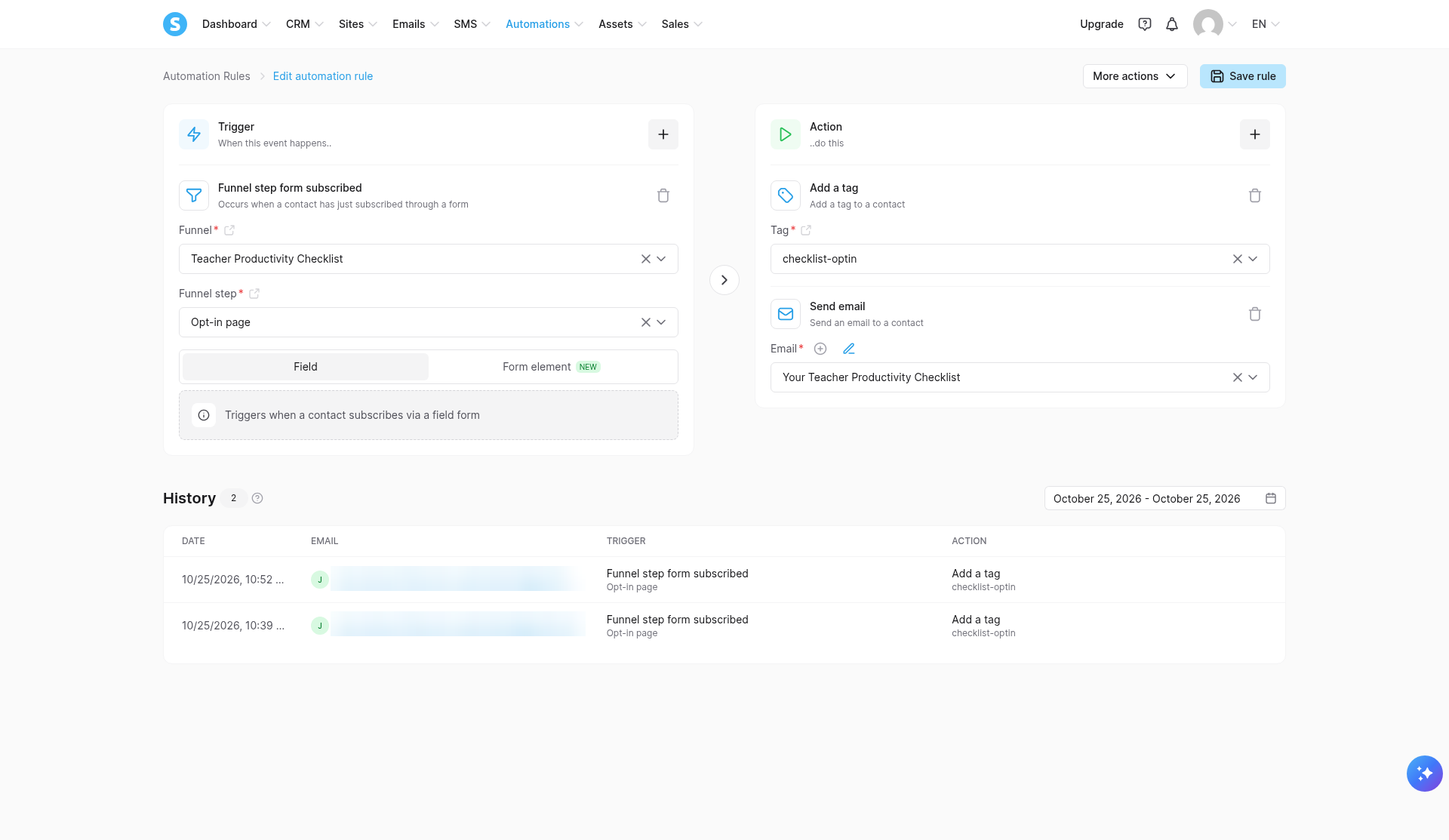
Then we opened the "My plan" page. Automation rules: 1/1. Tags: 1/1. One funnel in, and we were already full.
The good news is that one rule can hold more than one action, so a single freebie with a single welcome email fits fine. What you can't do is add a second rule for a second freebie, or tag buyers differently from subscribers. That's where the Startup plan's 10 rules and 10 tags come in.
Email works a little differently. Systeme.io doesn't cap how many emails you send on any plan, and newsletters are unlimited, but the pricing page lists one "email campaign" on Free. We only built one automated welcome email, so we didn't test exactly where that limit kicks in. If you're planning a multi-email welcome series on Free, check how it counts in your account before you write the whole thing.
The Systeme.io free plan limits, side by side
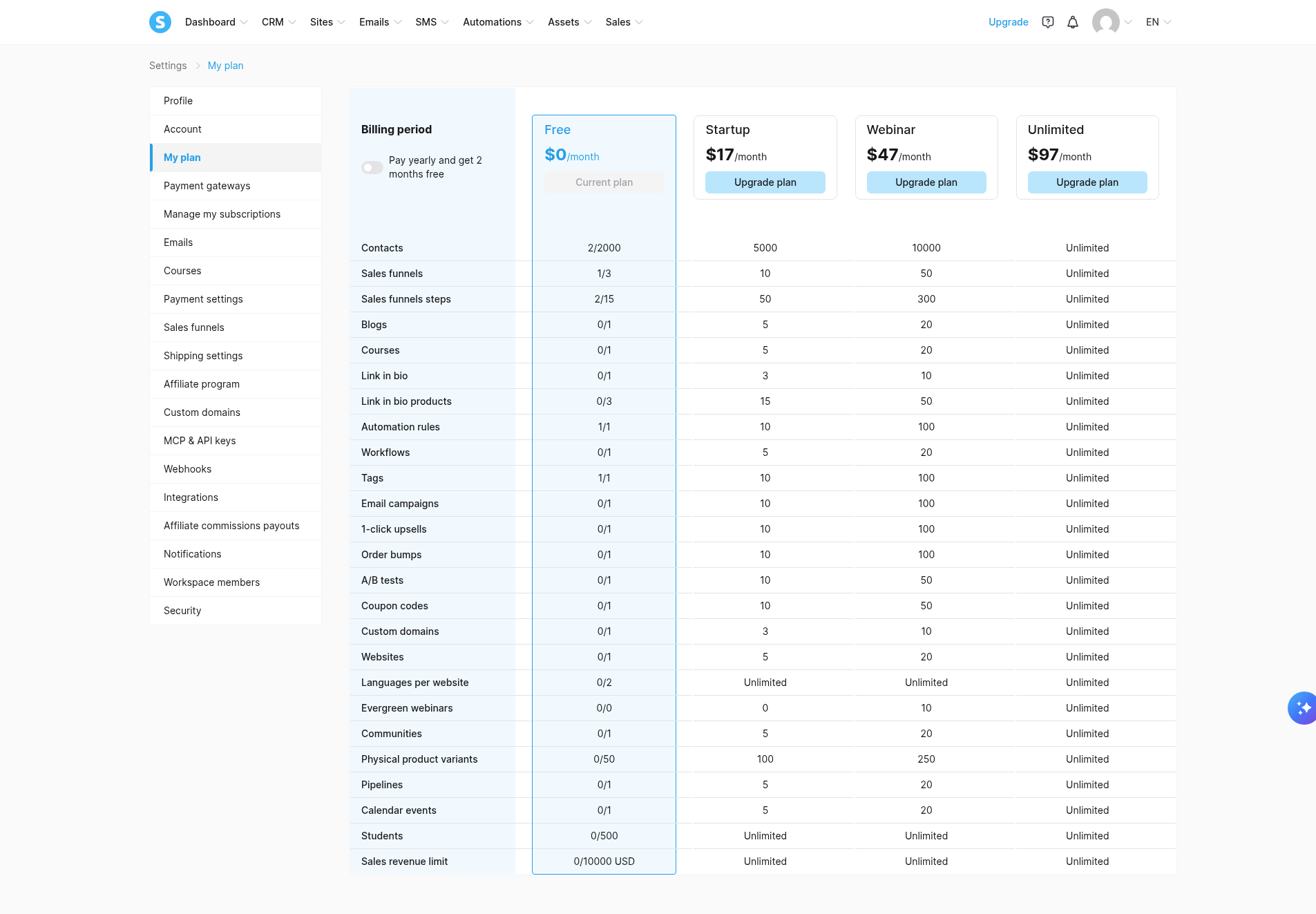
Everything else had plenty of room. Our funnel used 1 of 3 funnels, 2 of 15 funnel pages, and 2 of 2,000 contacts. Here's how Free compares with the first paid plan. The numbers come from Systeme.io's pricing page, and they matched the "My plan" page in our own account.
| Limit | Free ($0) | Startup ($17/mo) |
|---|---|---|
| Contacts | 2,000 | 5,000 |
| Sales funnels | 3 | 10 |
| Funnel pages | 15 | 50 |
| Automation rules | 1 | 10 |
| Tags | 1 | 10 |
| Email campaigns | 1 | 10 |
| Email sends | Unlimited | Unlimited |
| Courses | 1 | 5 |
| Students | 500 | Unlimited |
| Custom domains | 1 | 3 |
| Total sales | $10,000 | No cap listed |
| Transaction fees | 0% | 0% |
Pricing checked October 26, 2026, monthly prices in USD. Need more room? The Webinar plan is $47 a month and Unlimited is $97 a month, and paying yearly gets you "2 months free."
According to the pricing page, every plan, Free included, also gets unlimited sub-accounts, unlimited file storage, Stripe and PayPal, your own affiliate program, and 24/7 email support. We didn't build a course or test sub-accounts, so those numbers are Systeme.io's, not ours. We didn't sell anything either, so our account showed $0 of the $10,000 sales cap used.
One more small thing: our live page had a "Powered by systeme.io" badge in the bottom corner. We didn't test whether paid plans remove it.
Sending email takes one extra step
Free includes one custom domain for your funnels or website, and when we asked, Systeme.io support confirmed in writing that it can be a full domain or a subdomain. Sending email is a separate job, and it's the part that tripped us up.
We'd added our Gmail address as the sender. It showed "Verified," but Systeme.io still wouldn't send from it, and the sender dropdown stayed empty.
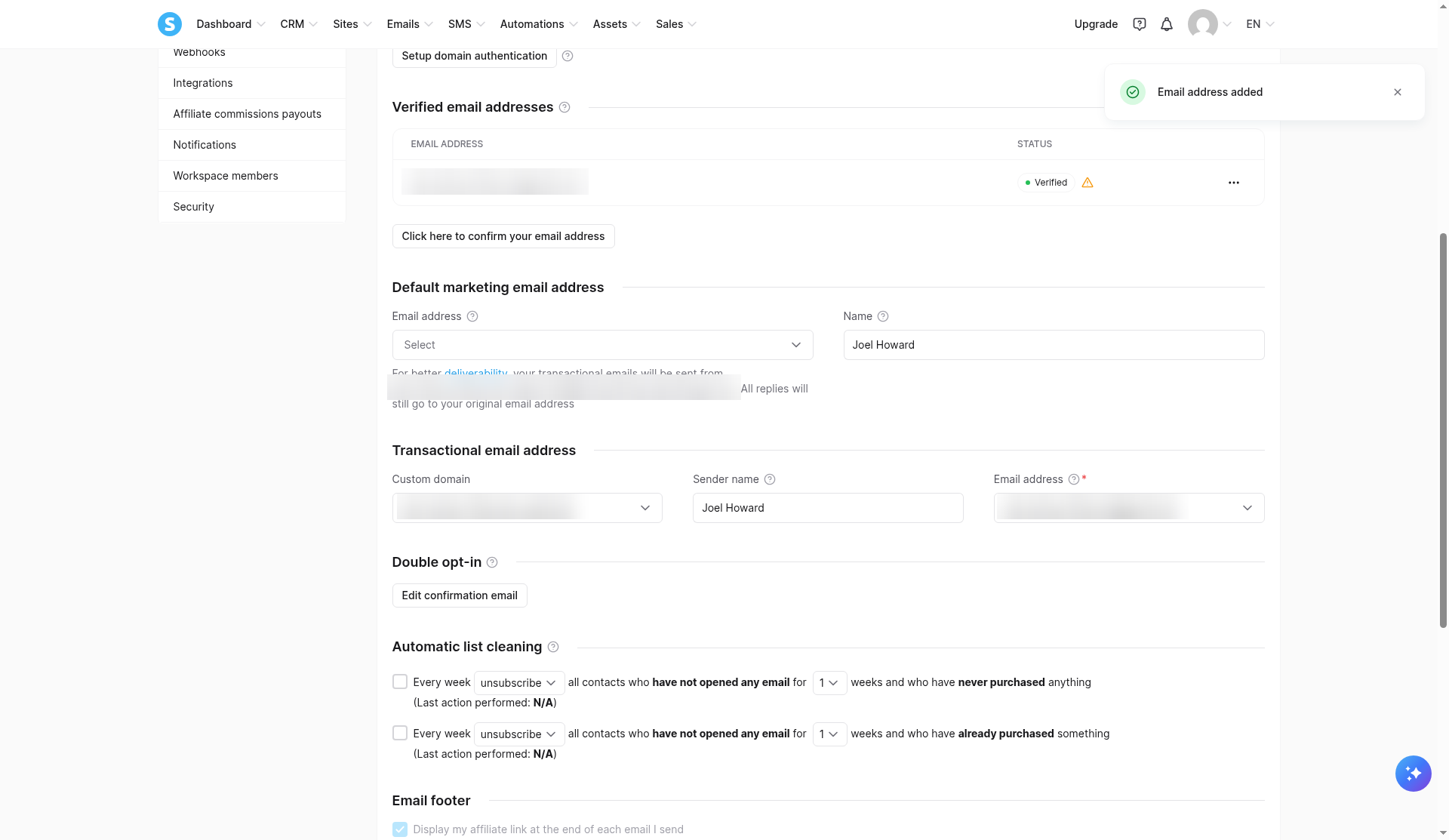
It turns out Systeme.io only sends from a domain you've authenticated. Adding four DNS records for our own domain took a few minutes, then Systeme.io took about nine more to confirm them, and the sender dropdown finally filled in. We walk through every click in our Systeme.io custom-domain email guide.
In that same settings screen, the "Display my affiliate link at the end of each email I send" box was ticked and greyed out on our free account. We didn't check whether that changes on a paid plan.
The fine print, and when to upgrade
A few rules on the pricing page are worth knowing before you build. We didn't trigger any of these ourselves, so this is Systeme.io's word, checked October 26, 2026.
The free plan has no end date, but an account with no login or activity for six months gets deactivated. If you go over a limit, you get a warning email each day for three days, plus an alert on your dashboard. On Free, day four is a hard stop: opt-in forms and payments stop, new contacts can't be added, emails pause, and students lose course access until you're back within your limits. Nothing is deleted. And once you hit the $10,000 sales cap, you have three days to upgrade to keep taking payments.
Paid plans work differently. Go over a limit there and you're moved up to the next plan automatically. Payments aren't refundable, either. If you cancel, you keep the plan until the next billing date, then drop back to Free.
So here's our take. Stay on Free while you're testing an idea or growing toward 2,000 contacts. It's a real plan, not a trial. Move to Startup ($17 a month) when you need a second rule or tag, more than three funnels, a second course, or more than 500 students. Since you can't get a refund, build and test on Free first, and only pay once a limit actually stops you.
Get it right the first time
Here's what our test taught us, in the order you'll need it:
- Plan your one rule before you build anything. Put every action inside it. Ours tagged the contact and sent the welcome email.
- Name your one tag after your freebie. Ours was checklist-optin, so it still makes sense when you upgrade and add more.
- Set up your domain before you write emails. Otherwise the sender dropdown stays empty. Here's our walkthrough.
- Add the email step before you share your sign-up page. People who signed up before we added it never got the email. It isn't sent after the fact.
- Fix the thank-you page right away. Ours was blank by default, and subscribers saw "This page is displayed because a thank you page was not defined." Applying the "Thank you!" template and editing it took us about three minutes.
- Check the mobile version, too. In our build, the headline, button, and top section had separate desktop and mobile versions.
- Test with a fresh address in a private window. One of our test sign-ups didn't register, and once the form kept an address we'd typed earlier (possibly autofill). Afterward, check the rule's History tab. It logs each action per contact but not delivery, so look in the inbox, Promotions, and spam too.
- Log in now and then. With the six-month inactivity rule, don't build a free funnel and forget about it.
If you want to see how Systeme.io stacks up against ClickFunnels, Kajabi, and Kit, our Systeme.io review has the whole picture. And if you'd rather just try it, the free plan costs nothing and needs no card.
Start your free Systeme.io account →
Disclosure: Some of the links on this page are affiliate links. This means if you click and make a purchase, we may earn a commission at no extra cost to you. We only recommend tools we have personally tested or thoroughly researched. Our opinions are our own.
