This post contains affiliate links. Full disclosure at the bottom.
Short version: Is the vidIQ free plan enough for a small channel? For research, mostly yes. Keyword searches, outlier videos and channel search cost us zero credits, and the channel numbers vidIQ gave us matched YouTube exactly. The catch is the AI Coach: every question cost 25 credits, and our free account had 170, so you get roughly six AI questions before you run dry. Lists and filters are capped or locked behind Boost, which was $16.58 a month billed yearly when we checked on October 30, 2026 (we've also seen it on sale for less).
I teach full time, and the YouTube side of Level Up Productivity mostly happens in the margins of my week. So when Joel and I looked at vidIQ, the question wasn't "is this the most powerful YouTube tool out there?" It was simpler: can someone with a small channel and no budget get real use out of the free plan, or is it just a long sales page?
We first signed up on October 26, 2026, while we were running the side-by-side tests for our OutlierKit review. Then on the morning of October 30 we sat down for a focused session on the free plan alone, with a stopwatch, a credit counter, and YouTube open in another tab to check vidIQ's numbers. Here's what happened.
First login: credits, and a lot of upselling
vidIQ no longer drops you onto a dashboard full of charts. Logging in took us straight to its AI Coach, a chat box that asks "Where should we start?" Down in the corner, the account label said Free, and the credit counter read 120 of 170 credits remaining.
That 170 surprised me. On October 26, our fresh account showed 150 credits. The difference came from a little banner that popped up: "+20 Credits Rewarded. Log in daily to keep earning free credits." What we couldn't find anywhere is whether the base free credits refresh each month or are a one-time allowance, so I won't guess.
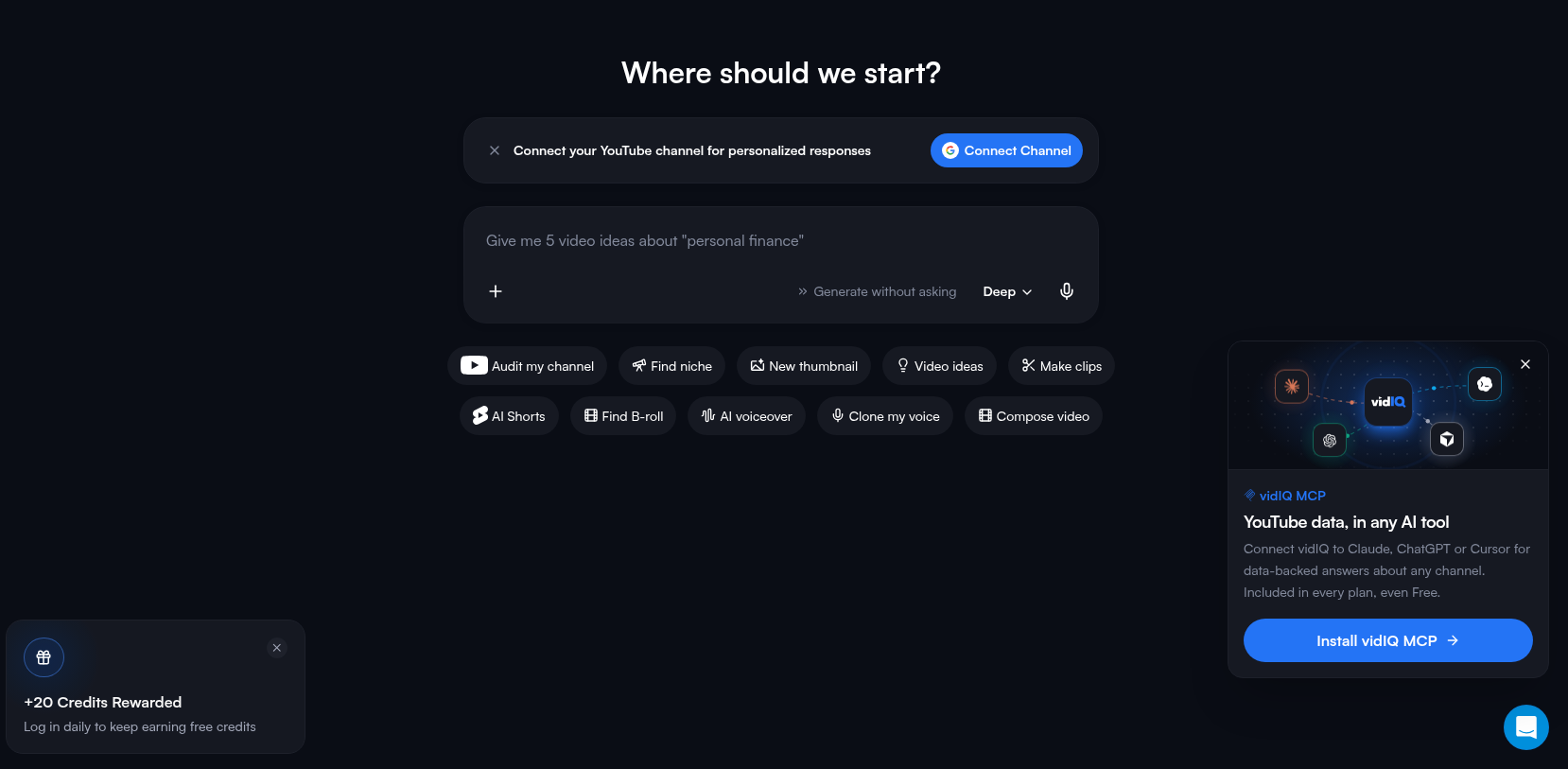
You'll also see a steady stream of upgrade prompts: a "Get Boost" button at the top, an "Unlock with Boost" overlay on most lists, and a pop-up for their vidIQ MCP connector. None of it stopped us from working, but it's there on nearly every screen.
Keyword research: free, and honest about small keywords
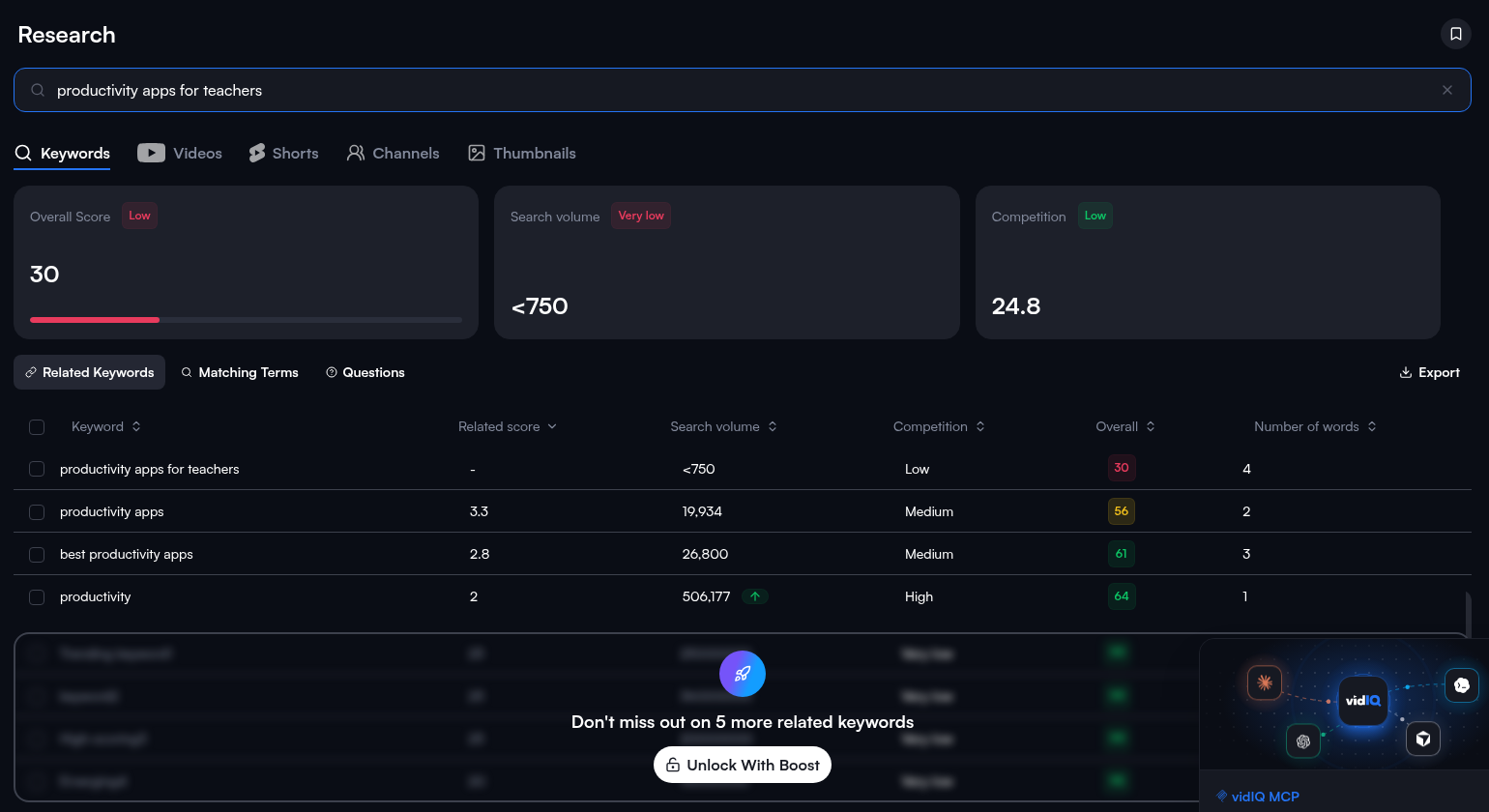
This is the part of the free plan I'd use every week. Under Research, I typed in "productivity apps for teachers," the kind of phrase I'd actually build a video around. Results came back in a few seconds and the credit counter didn't move.
vidIQ gave it an overall score of 30 (Low), search volume under 750 (Very low), and competition of 24.8 (Low). That's a sobering result for a topic I care about, but I'd rather know before I spend a weekend filming. Underneath were related keywords with real volumes: "productivity apps" at 19,934, "best productivity apps" at 26,800, and plain "productivity" at 506,177. After a few rows, the list blurs out with "Don't miss out on 5 more related keywords. Unlock With Boost."
One thing worth knowing: when we ran a different teacher keyword through both vidIQ and OutlierKit on October 26, the two tools disagreed a lot on volume. vidIQ said under 750, while OutlierKit gave a range of 2K–5K. Treat these numbers as a rough compass, not gospel.
Outlier videos: the most useful free feature
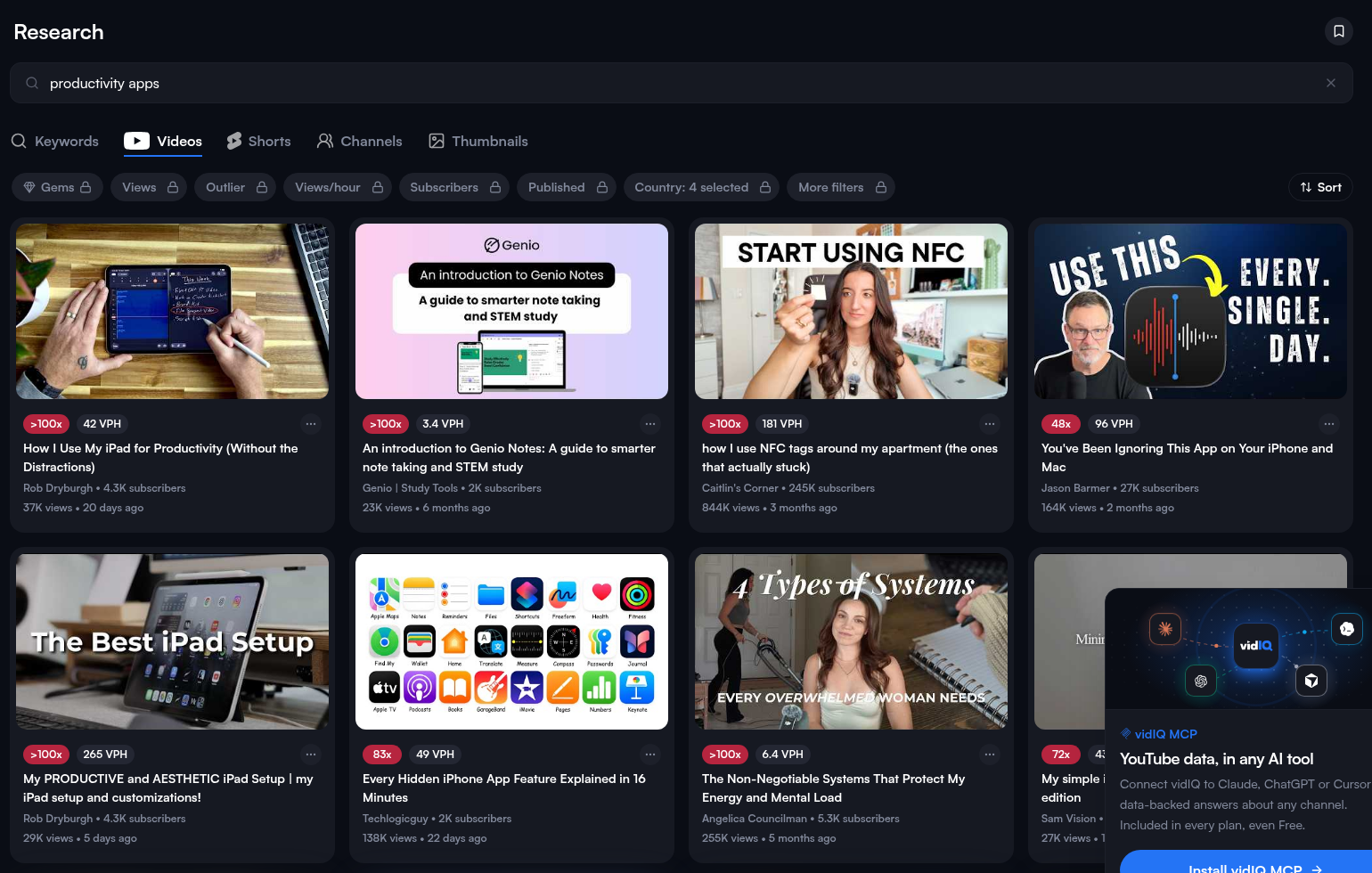
Outliers are videos doing far better than their channel usually does, and they're the best "what should I make next?" signal I know. I searched "productivity apps" and switched to the Videos tab. Again, zero credits.
The cards show an outlier multiplier and views per hour. One that jumped out: "How I Use My iPad for Productivity" by a channel with 4.3K subscribers, marked over 100x with 37K views in 20 days. That's exactly the kind of small-channel win I want to study. We got about a dozen cards before the "Get Unlimited Outlier Videos" lock. The filters for views, subscribers, outlier score and publish date all had padlocks, so on the free plan you can't narrow the list down to, say, small channels only.
Channel stats: accurate, but you have to ask the AI
This is where things got a little clunky. I wanted vidIQ's stats for Ali Abdaal's channel, so I typed "aliabdaal" into Research, then Channels. It returned unrelated channels instead. The same thing happened on October 26 when we searched for Easlo. As far as we could tell, the free web app doesn't let you look up a specific channel by its handle.
The workaround was asking the AI Coach: "Analyze the YouTube channel https://www.youtube.com/@aliabdaal: give subscribers, total videos, total views." It took about 32 seconds and cost 25 credits (120 down to 95). It came back with 6,700,000 subscribers, 1,501 videos, and 569,779,840 total views.
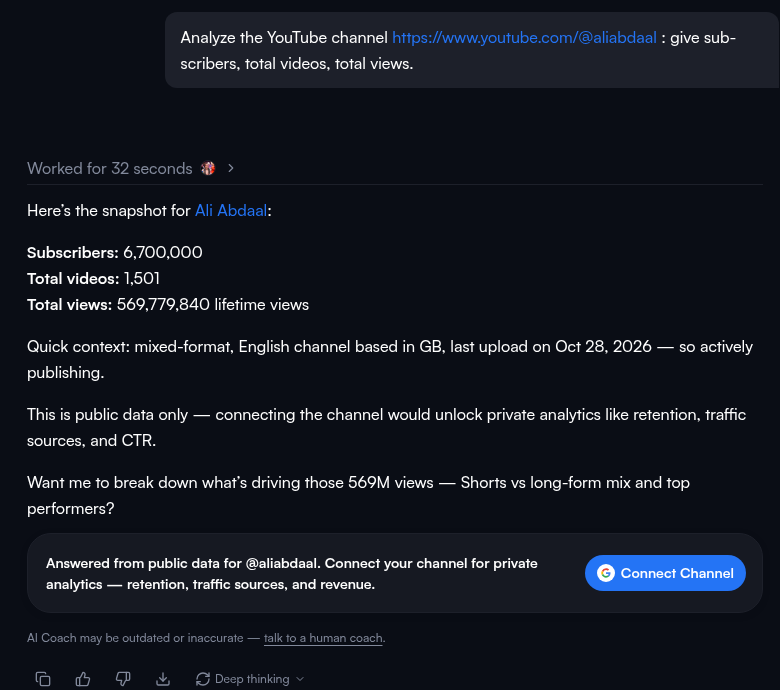
Then I opened Ali's channel on YouTube itself and checked the About panel: 6.7M subscribers, 1,501 videos, 569,779,840 views. An exact match on all three. Our October 26 Easlo test matched YouTube too. So the data is trustworthy. It's just that getting it costs credits when it feels like it should be a free lookup.
The AI title generator: genuinely good, with a quirk
Next I gave the AI Coach an idea I'd actually film: "How I plan a whole week of teaching in 30 minutes." I asked for five titles and three video angles. The send button showed the 25-credit cost before I clicked, which I appreciated. It worked for about a minute and a half and came back with a scored list.
The top title, "How I Plan a Week of Lessons in 30 Minutes," scored 94 out of 100. The rest landed between 87 and 90, and honestly, every one of them sounded like something a teacher would click on. It also suggested three angles, including a real-time "plan with me" video and one aimed at chronic overplanners. (Guilty.)
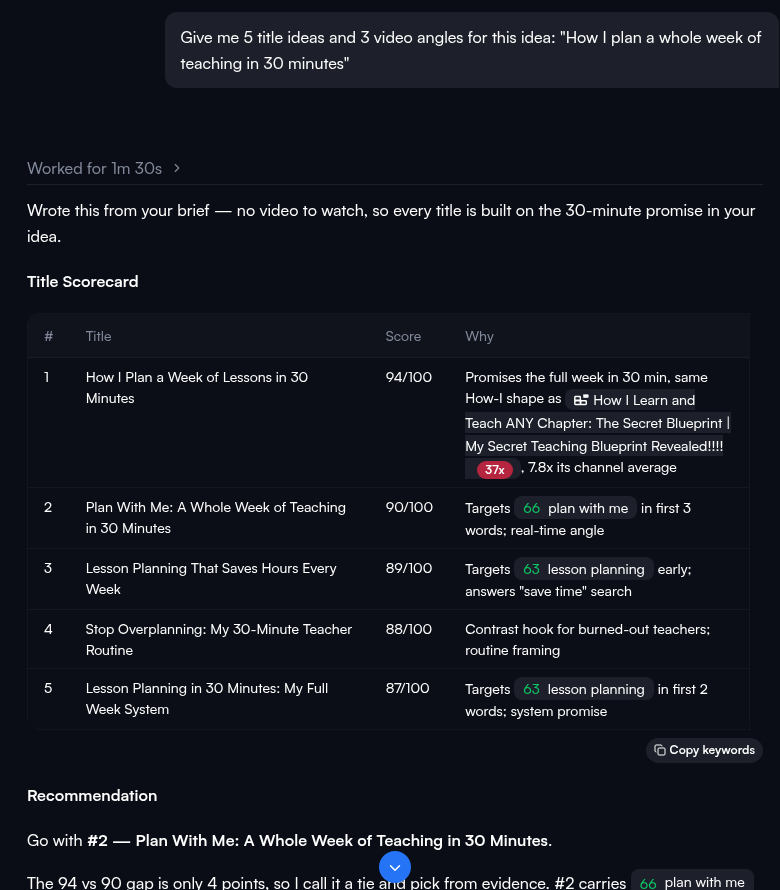
The quirk: it recommended title number two, "Plan With Me: A Whole Week of Teaching in 30 Minutes," which scored 90, over its own 94. Its reasoning was the search volume behind "plan with me." That's a fair argument, but it's a reminder to read the explanation rather than just grab the highest number. The chat footer itself says "AI Coach may be outdated or inaccurate," and the search figures it quotes aren't something we could check.
That second prompt took our balance from 95 to 70. Two AI questions, 50 credits gone.
What the free plan costs you, and what Boost costs
Here's the math from our session. Everything in Research (keywords, outliers, channel search) cost nothing. Every AI Coach prompt cost 25 credits. With 170 credits, that's about six AI questions. vidIQ's own comparison table shows the other free limits: 3 related keywords per search, 6 outliers per search, and Video Scoring 2 times per lifetime.
If you outgrow that, the Plans page (with the annual toggle on) showed Boost at $16.58 a month, billed $199 a year, with 2,000 AI credits a month. MAX was $39 a month ($468 a year) and Coaching was $99 a month. When I clicked one of the "Unlock with Boost" buttons, the checkout window showed Boost at $19 a month billed monthly, or $17 a month yearly. I closed it without entering anything.
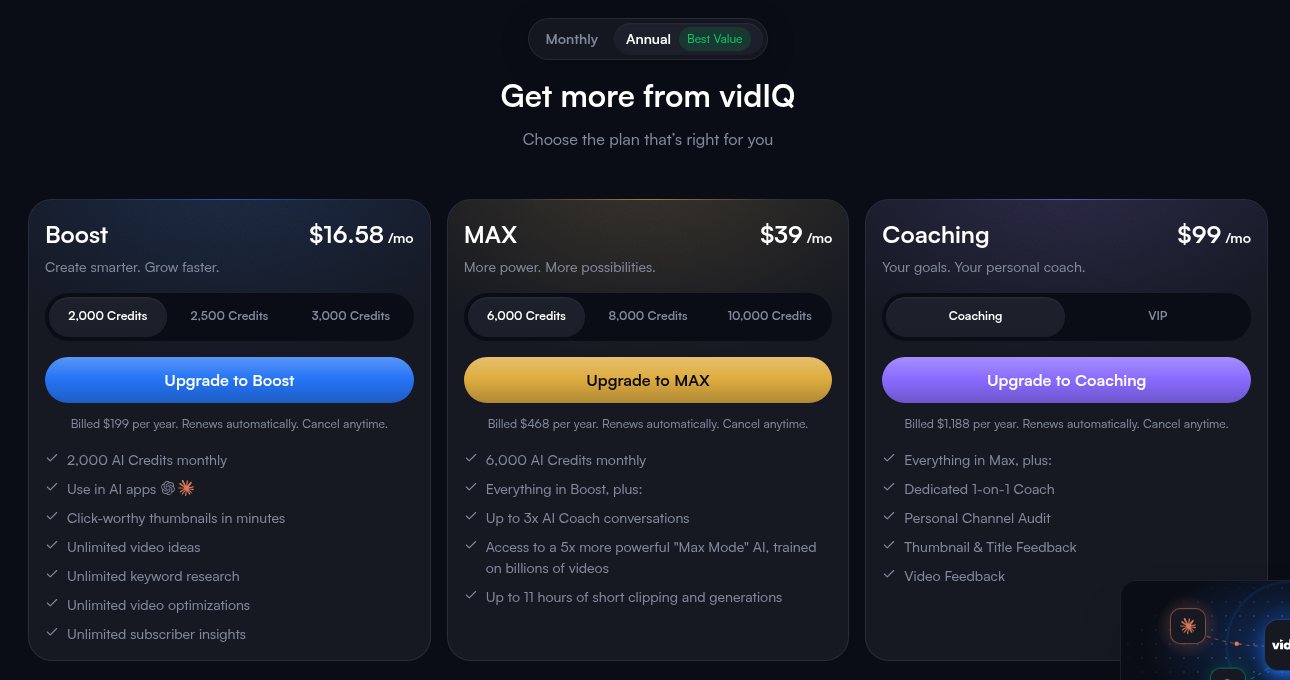
Pricing moves around, though. On October 26, the same page showed Boost at $8.29 a month during a sale. If you're thinking about upgrading, it may be worth waiting for one of those promos.
So, is the vidIQ free plan enough?
For a small channel, I think it is, as long as you use it for research and treat the AI as a treat. Keyword checks and outlier browsing are free, fast, and accurate enough to tell you whether an idea is worth filming. If I were starting today, I'd open vidIQ before every video, run the keyword, scan the outliers, and save my AI credits for the titles.
Where it falls short is depth. You can't filter outliers by channel size, you only see the first few related keywords, and looking up a specific channel costs AI credits. If you're publishing every week and leaning on the AI for titles and ideas, you'll hit the wall within a few days, and that's when Boost makes sense.
If you're weighing vidIQ against a dedicated outlier tool, our OutlierKit review covers the same kind of tests, and you can find everything else we use on our Tools page.
Start with vidIQ's free plan →
Disclosure: Some of the links on this page are affiliate links. This means if you click and make a purchase, we may earn a commission at no extra cost to you. We only recommend tools we have personally tested or thoroughly researched. Our opinions are our own.
