This post contains affiliate links. Full disclosure at the bottom.
Short version: Start with vidIQ's free plan if you want keyword ideas and a quick look at outlier videos without paying. OutlierKit gave us the fuller channel report, but its credits go quickly and its keyword search sometimes offers little beyond the phrase you entered. In our tests, both matched YouTube's public channel numbers. Neither one should make the final decision about your next video for you.
Why pay for research if a free plan answers the same question? On October 26, Joel and I gave vidIQ and OutlierKit three jobs: analyze the same YouTube channel, research a teacher phrase, and find that channel's outstanding videos.
I chose Easlo, a productivity and Notion channel with 111,000 subscribers. It has long videos and Shorts, and I could check both tools' numbers against YouTube myself instead of comparing feature lists.
The channel reports felt very different
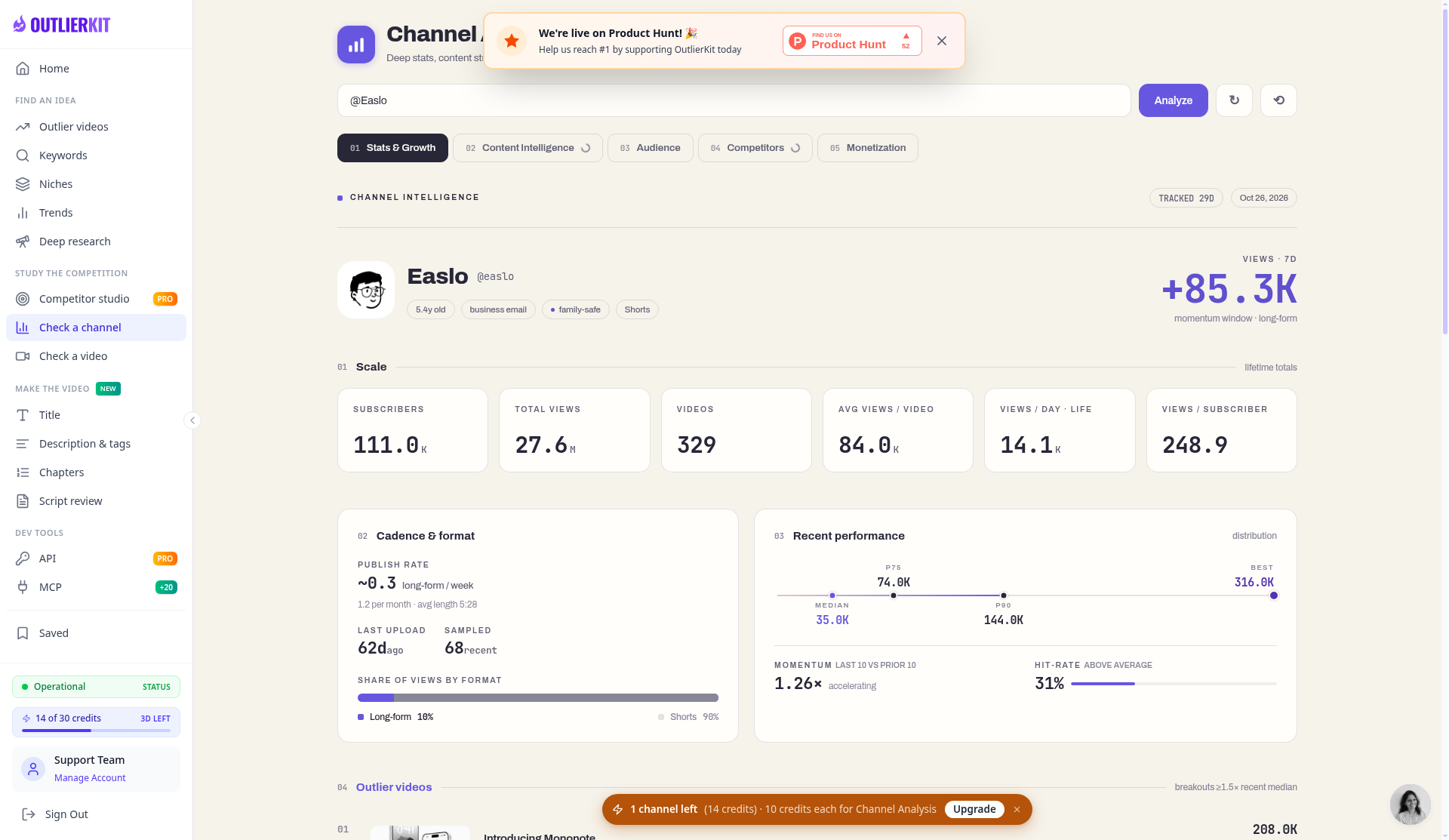
OutlierKit was the easier place to begin. I pasted in @Easlo and got a dashboard in about five to ten seconds. It showed 111,000 subscribers, 329 videos, and 27.6 million total views. Those figures matched YouTube, with OutlierKit rounding the larger numbers.
The report also gave a recent median of 35,000 views, a best result of 316,000, momentum of 1.26 times, a 31 percent hit rate, and about 0.3 long-form uploads a week. It showed how much viewing came from Shorts too. That context helps before judging one unusually successful video.
It cost 10 credits, one third of our 30-credit OutlierKit trial. That adds up when you are researching several competitors.
vidIQ did not give me the same direct route. Its channel search for Easlo returned unrelated channels, so I pasted the channel URL into AI Coach instead. That worked. About 13 seconds later, vidIQ returned 111,000 subscribers, 329 videos, and exactly 27,624,433 total views, matching YouTube. It also listed the three latest uploads, including "Introducing Mononote" at 208,735 views and two Shorts at 10,814 and 9,859.
That is one thing vidIQ did better: OutlierKit did not show a simple latest-three list. However, vidIQ used about 25 of the 150 AI credits available after email verification and required a workaround. For public statistics, a sixth of the allowance on one question feels inefficient.
One teacher keyword, two conflicting answers
Next I entered "how to plan your week as a teacher" in both keyword tools. A planning video takes time to prepare, and I would rather know whether anybody is looking for it before spending an evening on it.
OutlierKit answered in about five seconds for 2 credits. It estimated 2,000 to 5,000 searches, marked the difficulty Low, and gave the phrase an opportunity score of 72, or Good. It was a clear screen and very easy to understand.
vidIQ answered in about three seconds without using credits. It estimated fewer than 750 searches, gave competition a Low score of 39, and rated the overall opportunity 24, also Low. The two tools therefore pointed me in nearly opposite directions for the same phrase.
I will not declare one estimate correct because the other is bigger. OutlierKit describes its volumes as third-party estimates, and 2,000 to 5,000 is a broad range. My test did not settle the difference. Treat these numbers as research clues, not as viewers waiting for your video.
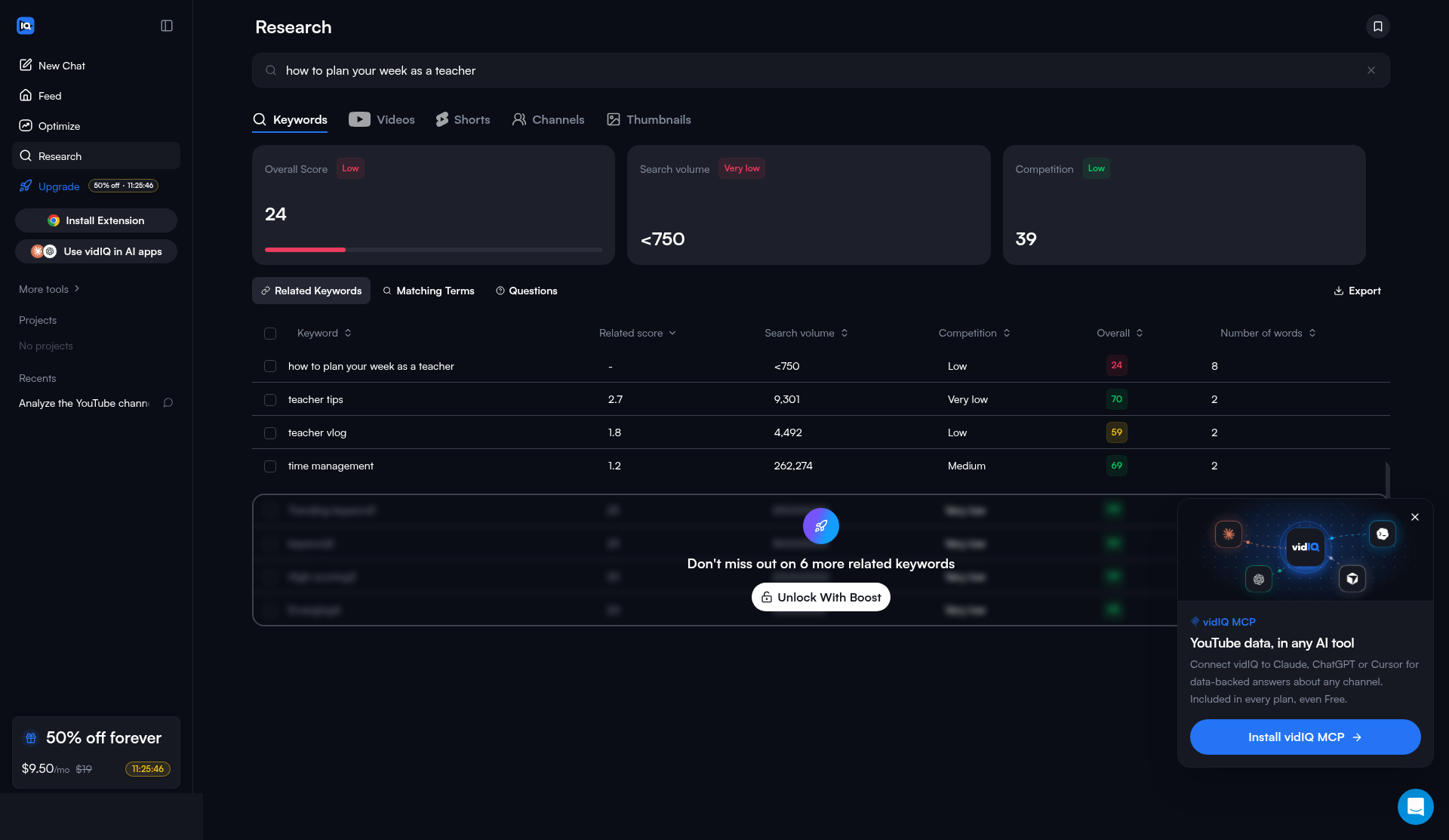
vidIQ was more useful for what to try next. It offered "teacher tips" with 9,301 estimated searches and an overall score of 70, "teacher vlog" with 4,492 and 59, and "time management" with 262,274 and 69. These are not interchangeable, and the last is much broader, but they give me something to consider. Free results stopped after three related suggestions, with six more locked behind Boost.
OutlierKit returned only my exact phrase. Advanced Research was offered for 10 credits, but I did not buy it. An opportunity score is less useful without neighboring ideas. In an earlier test, "productivity apps for teachers" did produce five related phrases, so the inconsistency matters more than the tidy score.
Finding outliers took a wrong turn
My last job was to find Easlo videos that beat the channel's normal performance. It became a lesson in testing tools rather than trusting menu names.
I entered @Easlo into OutlierKit's outlier research and got "No outliers found." It charged 2 credits anyway. The search is intended for a niche or topic rather than one channel, but the empty answer did not explain that to me. I had already paid for channel analysis, and the information was actually sitting in section 04 of that report at no extra charge: "Introducing Mononote" with 208,000 views at 5.9 times the channel median, and "My Minimalist iPhone Setup" with 188,000 at 5.4 times.
vidIQ found the second video too, through another AI Coach question. It reported 188,901 views, a 4.02 times breakout score, and 3.20 times the channel average. It also said that only one scored outlier was indexed and that Shorts were not covered for this channel. That was a limited answer, but an honest one. The question used about another 25 credits and took roughly 25 seconds.
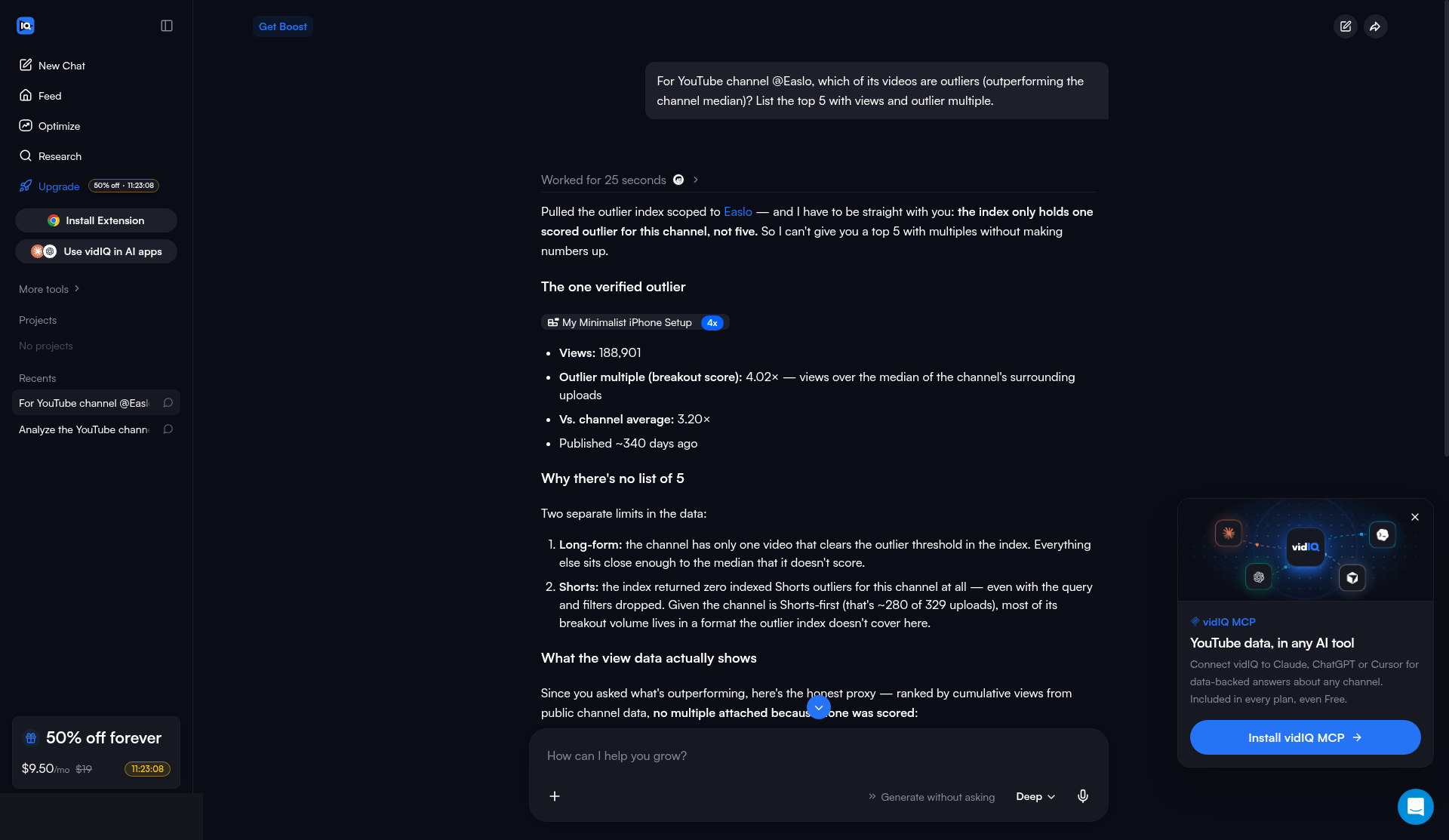
The different multipliers are another reason not to treat the tools' scores as standardized. Our guide to finding real outlier videos explains how we check channel size and actual views.
Which one I would use
For a small channel starting with no budget, I would use vidIQ's free plan first. Keyword searches and general outlier browsing did not use AI credits in our sessions, although the related keywords, outlier results, and filters are limited. I would save the AI Coach for questions I cannot answer through the research screens. We go through its other limits in our vidIQ free plan review.
I would consider OutlierKit when a detailed channel report justifies paying. Its context was more useful, and reopening a cached analysis cost nothing more. The Hobby plan was $49 a month for 100 credits, or $299 a year ($24.92 a month), when we checked. A 100-credit top-up was $19. Since channel analysis cost 10 credits, I would plan before clicking. Our full OutlierKit review covers the trial, and OutlierKit's site has current plans.
vidIQ's paid pricing also needs checking on the day you buy. Its annual page showed Boost at a promotional $8.29 a month on October 26 and $16.58 a month, billed $199 a year, on October 30. We stayed on the free plan and entered no card details.
My answer is to use vidIQ to gather possibilities for free, and consider OutlierKit for closer study of fewer channels. Neither removed the need for judgment. A score can help me choose what to investigate, but it cannot tell me whether an idea will actually help the people I am trying to teach.
Disclosure: Some of the links on this page are affiliate links. This means if you click and make a purchase, we may earn a commission at no extra cost to you. We only recommend tools we have personally tested or thoroughly researched. Our opinions are our own.
