This post contains affiliate links. Full disclosure at the bottom.
Short version: I ran this Kit free plan review on November 15, 2026, by signing up, publishing a lead-magnet page, and wiring a welcome email. Kit never asked for a card. The free plan, labeled Newsletter, is $0 a month for up to 10,000 subscribers, and the one basic Visual Automation I needed was included. The tighter limit is not the subscriber cap. You get 1 email sequence and 1 basic Visual Automation, so a second lead magnet or a nurture flow needs a paid plan. After I confirmed the test signup, the welcome email arrived at 9:27 a.m. Eastern Time, but it landed in Gmail's Spam folder. Set a sender name and authenticate your domain before you send real traffic to the page.
Try Kit free (no card needed) →
Kit's free plan promises up to 10,000 subscribers and the line "No cost. No catch." I wanted to know what that plan can do for a creator or solopreneur who needs one lead-magnet page and a welcome email, so on November 15, 2026, I signed up and built one.
Signing up and building the landing page
Signing up took about five minutes. Nobody asked for a credit card. Onboarding asked whether I was importing from another tool, how big my audience was, my website, a business name, a Kit subdomain, what kind of creator I am, my topics, and a short bio. I landed on the dashboard, which was already showing a 25% off Pro annual promo for the first year, good through November 30.
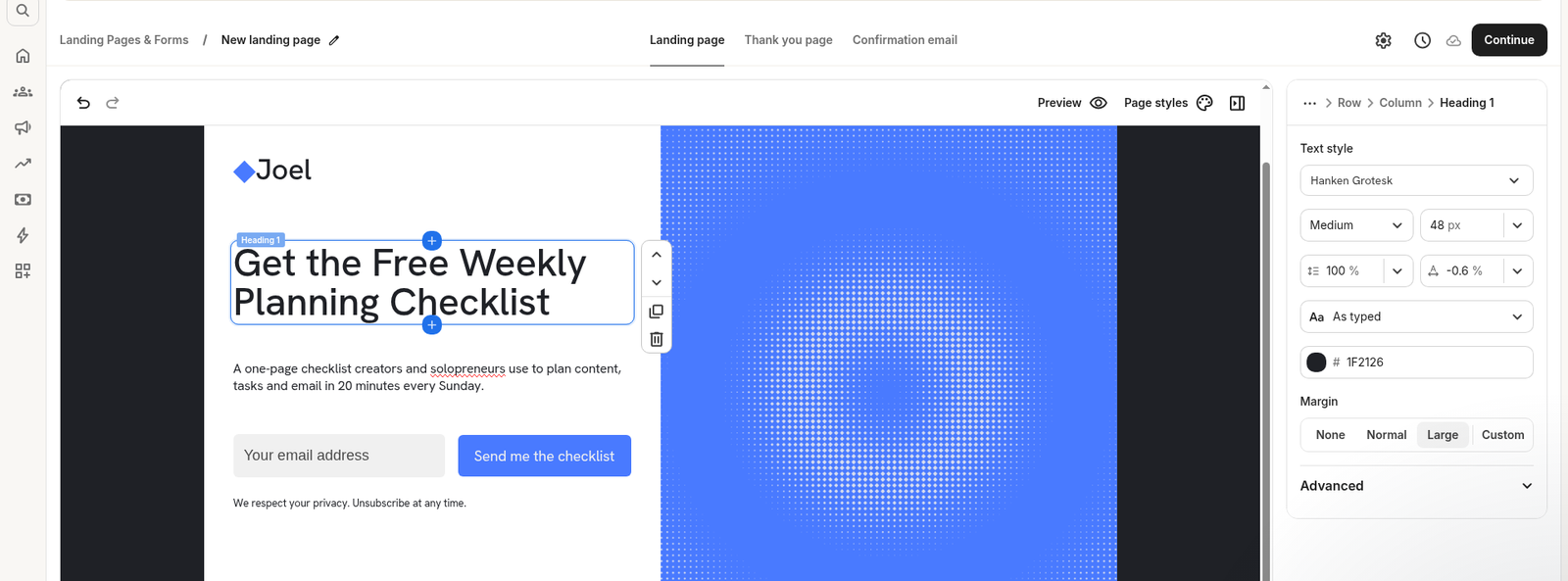
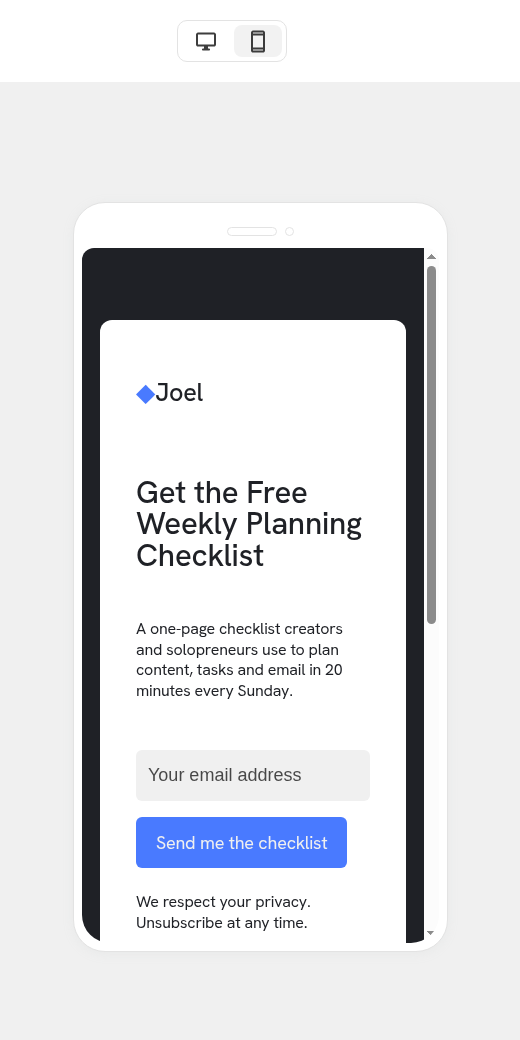
From there I built a Free Weekly Planning Checklist page, the kind of opt-in a solo creator would use. I started from Kit's Beacon template, a compact one-screen layout with a headline, a short subhead, an email field, and a blue image panel. Editing happens right on the page, with a style panel on the right. Preview has Desktop and Mobile views, and the mobile version opened in a phone frame. The fiddly part was punctuation: when I selected a word, the mark at the end sometimes stayed behind, and I had to clean it up by hand.
I had the page published in about 8 minutes and 47 seconds, timed from the first "Create a landing page" click to the success dialog.
The name field that didn't appear
Beacon's form started with email only. I added an optional First name field in the editor, and the form-fields list showed it as a second input. After I republished, the live page still had only an Email box. I couldn't collect a first name on that form, so I submitted the test signup with email alone.
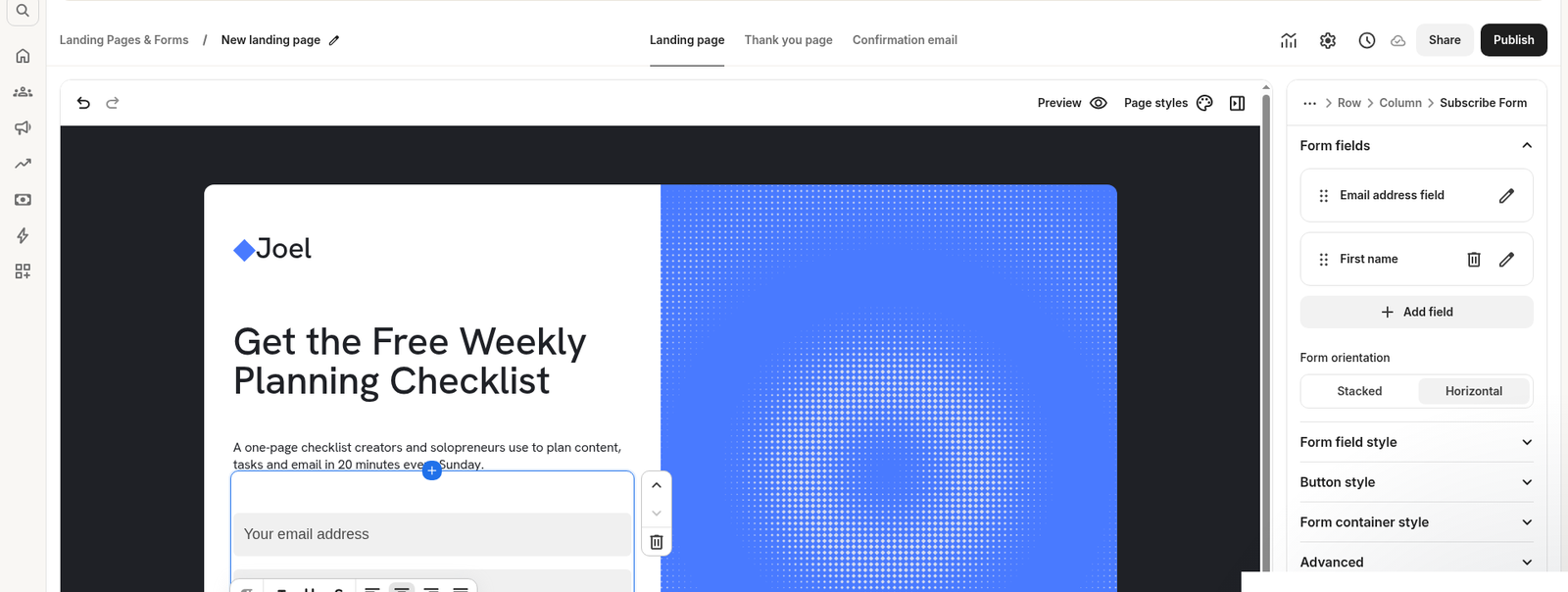
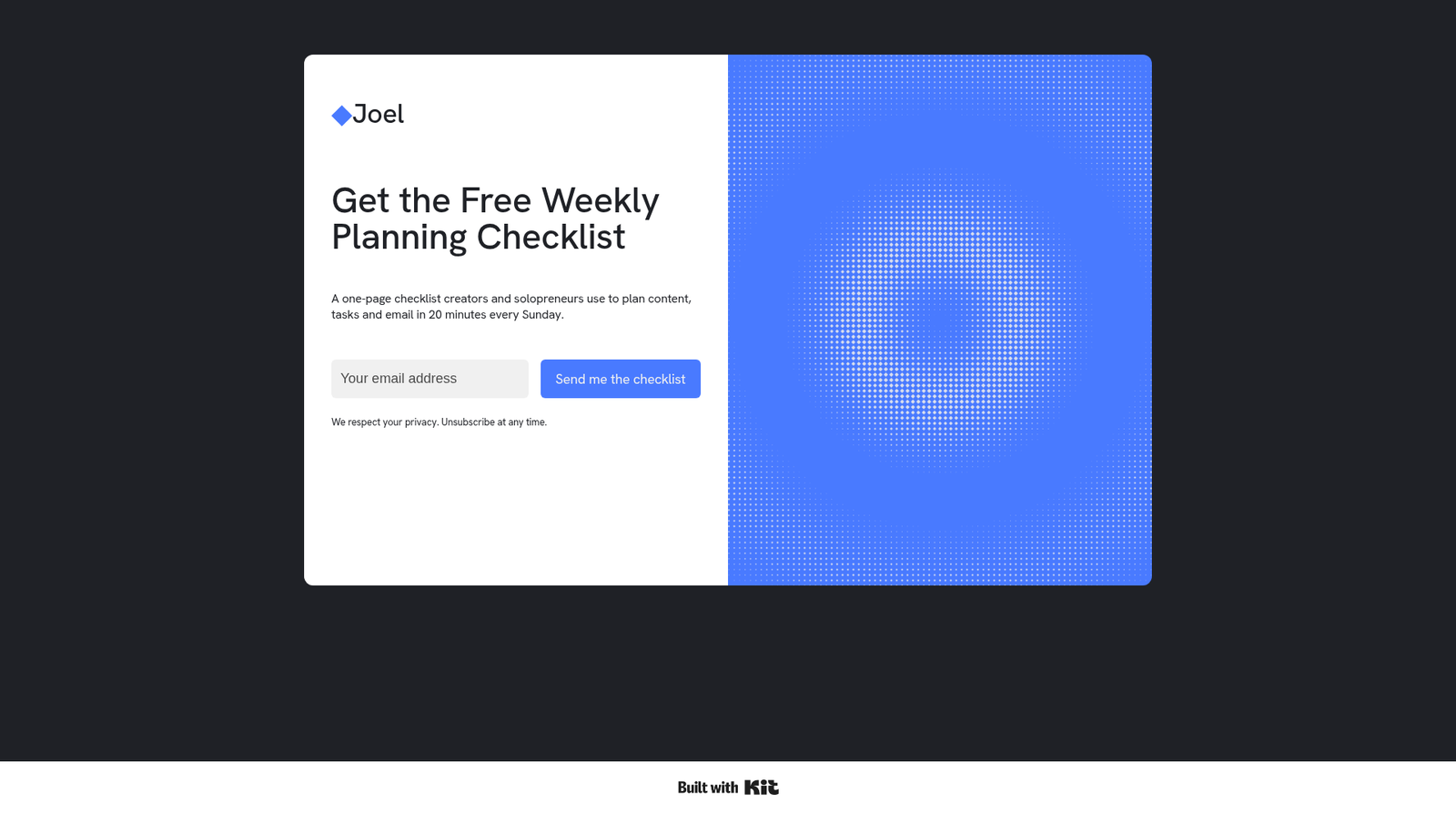
That is the kind of miss you only catch if you open the public URL, not just the editor. If you need a name, look at the live page before you share it.
A welcome automation, with no upgrade wall
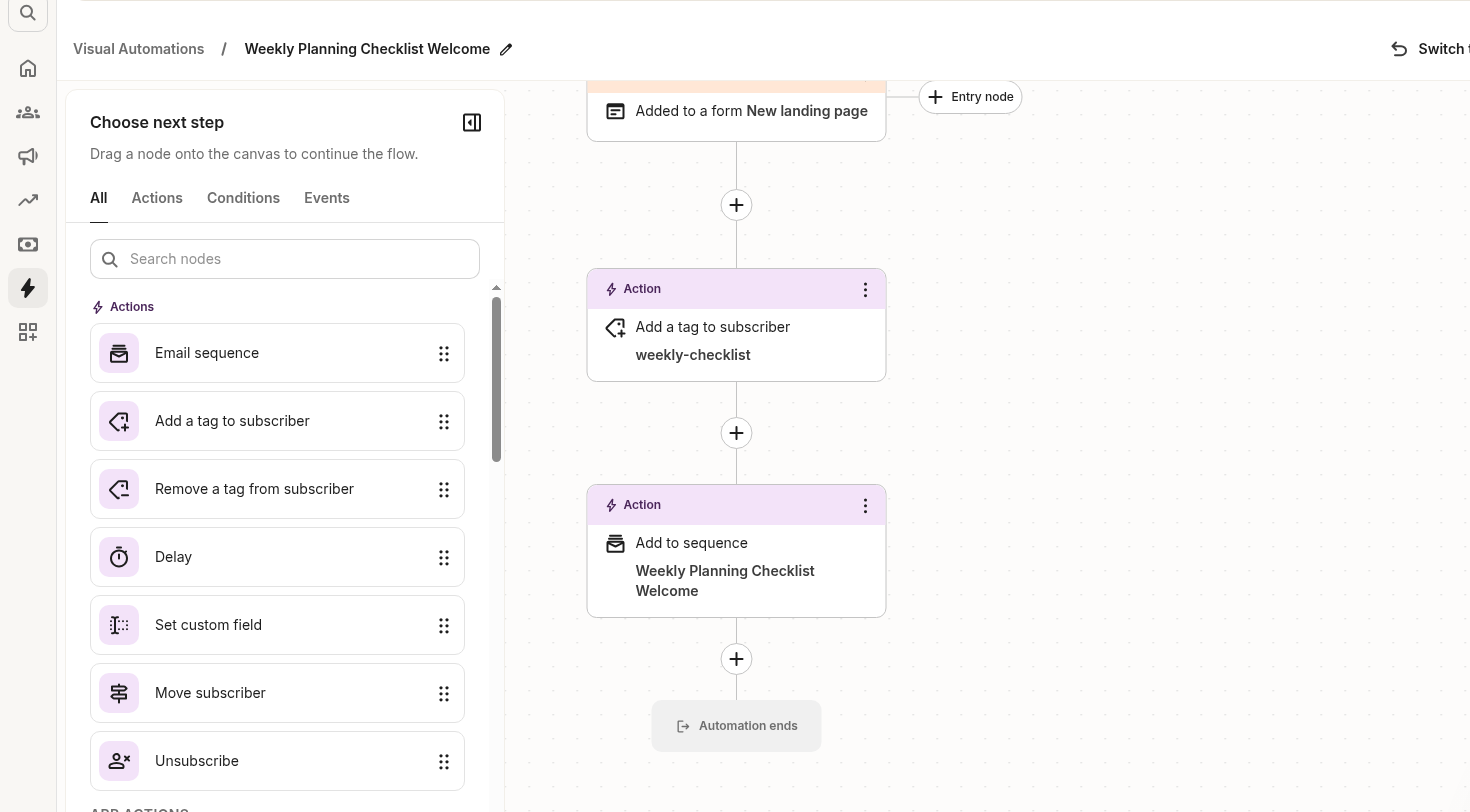
Next I built the flow I needed: when someone joins the form, tag them weekly-checklist and add them to a one-email sequence. I named the sequence Weekly Planning Checklist Welcome, set the subject to "Your Weekly Planning Checklist is here," and set it to send as soon as possible.
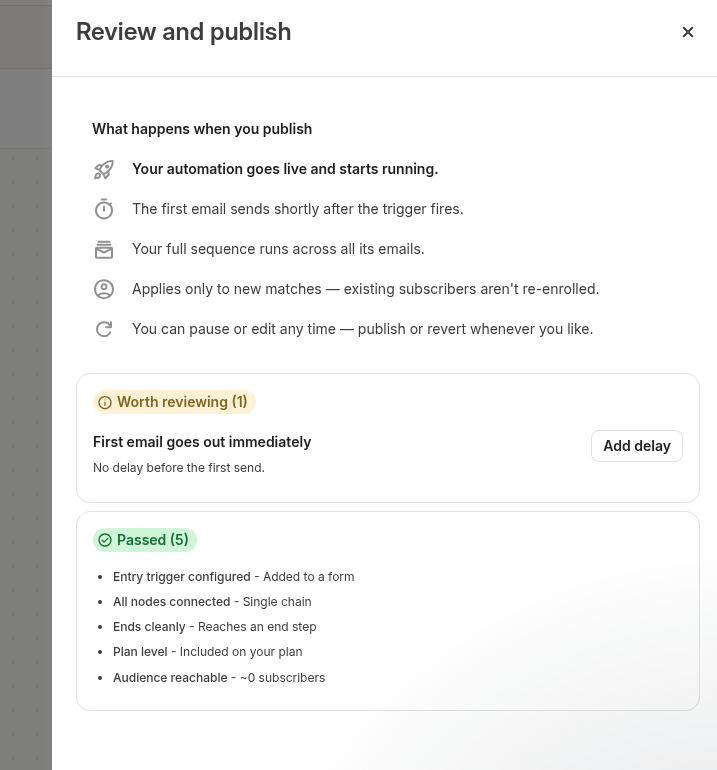
That Visual Automation took about seven minutes. When I went to publish it, the review screen said "Plan level - Included on your plan." There was no upgrade wall. It also warned, in those words, "First email goes out immediately," with a note that there is no delay before the first send. Read that before you turn the automation on, especially if you already have people on the form.
What happened to the test emails
I submitted a test address on the live page at 9:22 a.m. Eastern Time. Kit showed a "Thanks for subscribing!" message, then a recommendations chooser with other creators already checked. I chose Maybe Later and did not subscribe to anyone else.
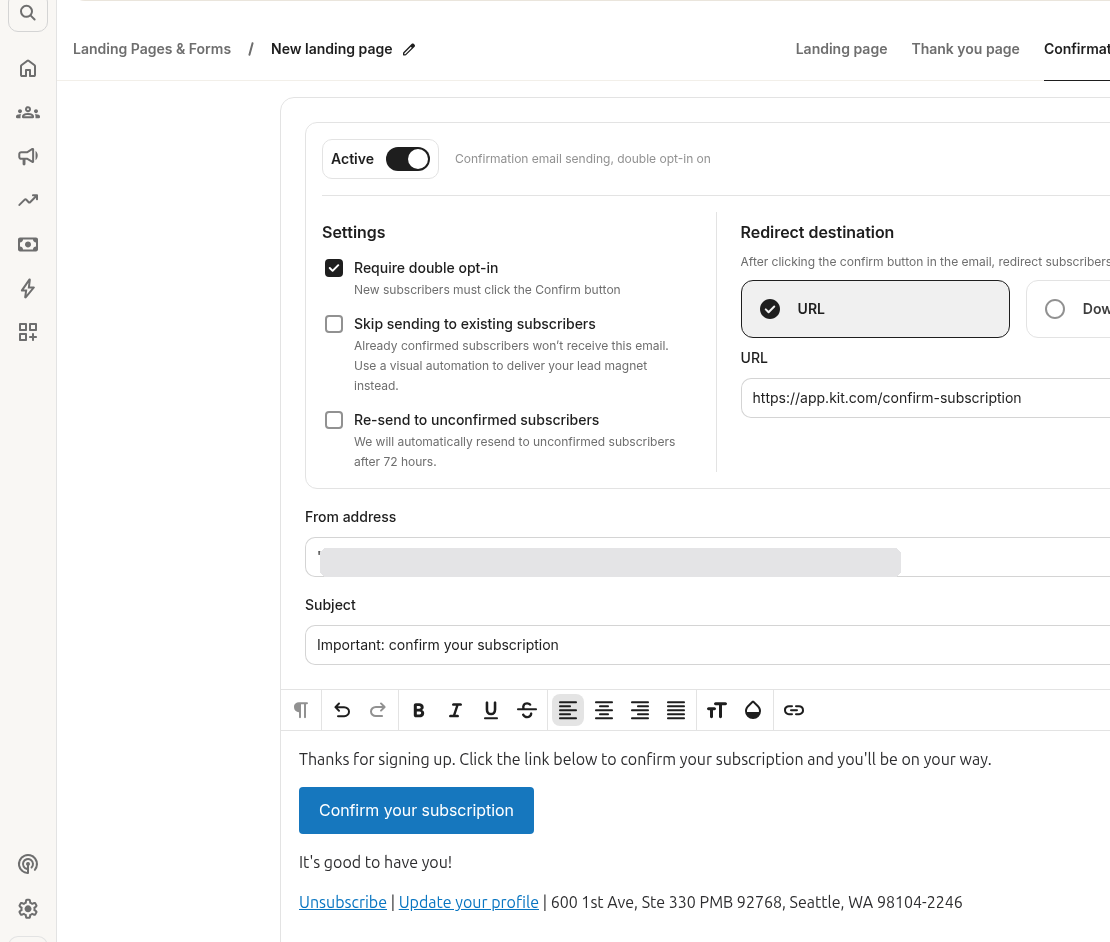
Double opt-in was on by default. The confirmation email's subject was "Important: confirm your subscription." It arrived in Gmail about six seconds later, at 9:22 a.m. Eastern Time, but it landed in the Forums tab, not the primary inbox. The default From name was the raw Gmail address I signed up with, and the message was sent from that address at mail.kit.com.
I clicked the confirm link at 9:26 a.m. Eastern Time. The welcome email, "Your Weekly Planning Checklist is here," arrived at 9:27 a.m. Eastern Time. It was also marked as Forums, and this one landed in Spam. The From name was again the raw Gmail address. I had not set a display name or authenticated a domain, and the email included a "Built with Kit" badge. If I had only checked the main inbox, I would have thought the sequence failed.
Have you ever signed up for a freebie, glanced at your inbox, and assumed the email never came? Check Spam and Gmail's other tabs, and set a sender name and authenticate your domain before you invite real subscribers.
The Kit free plan limits
On the in-app plan page, the free tier is called Newsletter, $0 a month, with the line "No cost. No catch." It allows up to 10,000 subscribers, 1 basic Visual Automation, 1 email sequence, and 1 user. Landing pages, forms, and broadcasts are unlimited.
Here is how that compared with Creator on November 15, 2026, from the monthly view of the same page:
| Limit | Newsletter (Free) | Creator |
|---|---|---|
| Price | $0/mo | $39/mo, or $33/mo billed yearly ($390/year) |
| Subscribers | Up to 10,000 | Up to 1,000 |
| Visual Automations | 1 basic | Unlimited |
| Email sequences | 1 | Unlimited |
| Users | 1 | 2 |
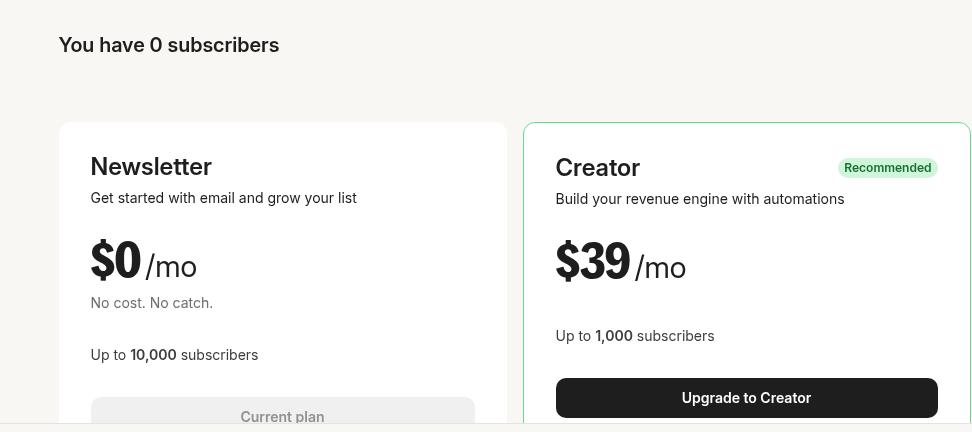
Creator's subscriber cap is listed at 1,000, which is lower than the free cap. I didn't test what happens if you grow past that on Creator, so I won't guess.
The plan page also lists, on free, a newsletter feed and site, audience tagging and segmentation, digital products and subscriptions, required free recommendations, API access, a customizable domain, and 24/7 support. I didn't test those, so those are Kit's claims, not results from this session. Creator adds unlimited Visual Automations and email sequences, 2 users, and extras such as Kit MCP, paid or smart recommendations, removing Kit branding, polls, the Kit App Store, RSS campaigns, Kit Studios hours, and live chat and email support. I didn't test those Creator extras either.
The dashboard's 25% off Pro annual promo was for the first year, through November 30. The monthly comparison listed Pro at $79 a month. I didn't start a Pro or Creator trial, and I didn't enter a card. The yearly Creator checkout card showed $390 plus tax, billed after a free trial ending November 29, 2026. I closed it without selecting a plan.
Where you'll hit the paywall
You probably won't hit the 10,000-subscriber cap first. In this test, the tighter limits were the single sequence and the single basic automation.
One lead magnet with one welcome email fits. A second freebie with its own sequence, or a longer nurture flow, does not, at least not on this plan. That is the point where Creator starts to make sense.
The 1-user cap would also matter if two people need to share the account. I didn't try adding a second login, so I can't say how that looks in practice.
I did not hit a wall while building this first funnel. The page, the tag, the sequence, and the automation all published on free.
If that one-automation ceiling sounds familiar, it should. When we built a similar opt-in in Systeme.io, the first funnel used up the free plan's one automation rule and one tag. The details differ, and Kit's subscriber cap is much higher, but the planning problem is the same: put everything you need into that one flow, or be ready to pay when you add a second one. Our notes on Systeme.io's free plan limits walk through that catch in more detail.
Pros and cons
What worked in this session:
- No credit card, and I was on the dashboard in about five minutes.
- Beacon was a compact one-screen template, and I had a live page in under nine minutes.
- Inline editing plus a right-hand panel, with a real mobile preview.
- Double opt-in settings were easy to find, and they were on by default.
- The basic Visual Automation and one-email sequence published without an upgrade wall.
What got in the way:
- Punctuation cleanup in the editor was fiddly.
- A First name field added in the editor did not appear on the live form.
- After signup, Kit showed a recommendations chooser with other creators already selected.
- The default From name is your raw email address. My confirmation went to Gmail's Forums tab, and the welcome email went to Spam.
- One sequence and one basic automation is tight once you outgrow a single freebie.
The verdict
Start on the free plan. For one lead magnet and one welcome email, it did the job, and the 10,000-subscriber cap is generous. The catch is not a hidden fee. It is that you only get 1 basic Visual Automation and 1 email sequence.
If you plan to add a second lead magnet or a real nurture sequence, I would budget for Creator. That was $39 a month, or $33 a month if you pay yearly, when I checked on November 15, 2026. I would still start free, set a sender name, authenticate your domain, and test the opt-in from a fresh address, including Spam and Gmail's other tabs, before you share the page.
You can find the other tools we use on our Tools page.
All pricing as of November 15, 2026, from Kit's in-app plan page
Disclosure: Some of the links on this page are affiliate links. This means if you click and make a purchase, we may earn a commission at no extra cost to you. We only recommend tools we have personally tested or thoroughly researched. Our opinions are our own.
